Introduction
- Adding Shipping costs for FBM orders can be a tedious task, especially when you have many orders to deal with every day.
- We currently do have a feature where you can bulk upload shipping cost for your past FBM/FBA orders.
- But we have now implemented a new feature where you can now prefix Shipping cost for all your future FBM orders.
- This would not only save time but also save a lot of manual work.
- Please do note that the prefix value will be applied to future orders only.
- For past orders, you need to use:
- https://new.sellerlegend.com/knowledgebase/how-do-i-bulk-import-export-shipping-costs-for-past-fbm-fba-orders/
- UPDATE: This also works for FBA orders now, in case you need to set a shipping cost beforehand.
How Do I Enter FBM Shipping Costs?
- If you handle FBM orders, you as a seller are responsible for shipping and of course, you will incur shipping costs
- If you do not record those shipping costs as part of the order, your overall profit will be overstated
- Please go to Products->Product List and follow the steps below:
-
Navigation: Products and Inventory → Products List
-
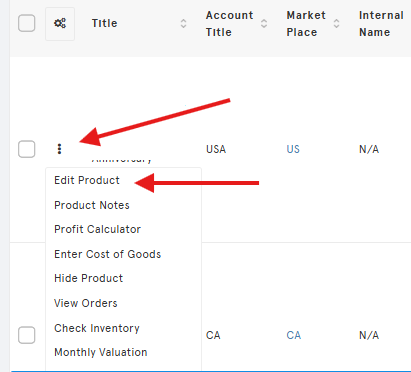
Action: Find your product and click the Actions (⋮) icon.
-
Edit: Choose Edit Product.
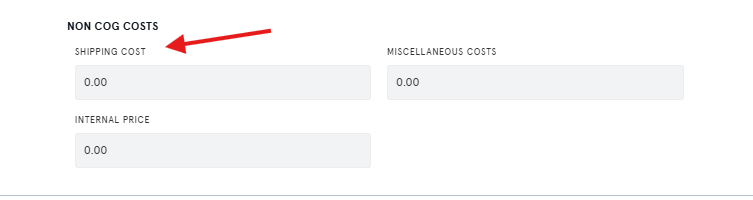
- Scroll down and enter shipping costs
-
- You can also use the product settings file to bulk upload FBM shipping cost if you have 100s of products.
- https://new.sellerlegend.com/knowledgebase/how-do-i-bulk-import-export-shipping-costs-for-past-fbm-fba-orders/