How To Get Here?
- From the Menu
- Warehouses -> Warehouses list
- Warehouses -> Warehouses list
What is it for?
- To see the list of all the warehouses where your product is stored.
- This screen tells us all the details regarding Amazon’s warehouse (Seller storage centre) where your product is currently residing.
- You can also add custom created warehouses (Internal storage centre)
- These may be the warehouse where you store your products before sending them to Amazon.
Screen Print
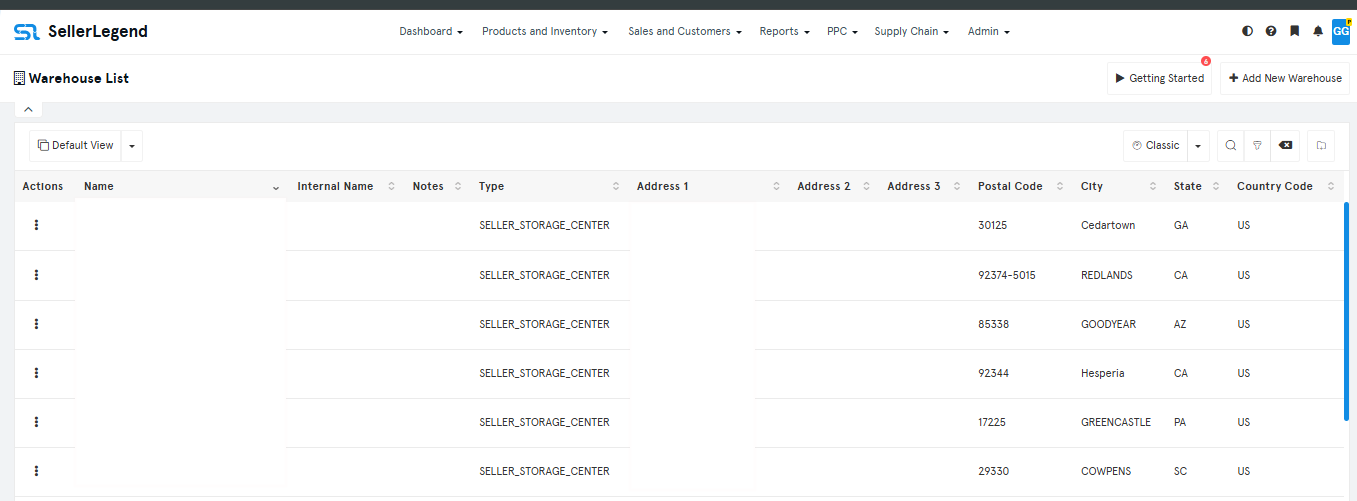
Content
- Actions Button
- Click on the Action Button to reveal links to
- Edit Warehouse
- Warehouse Inventory
- Internal Shipments
- Inbound Shipments
- Click on the Action Button to reveal links to
- Name
- The name you have assigned to the warehouse.
- Internal Name
- The Internal Name you have assigned to the product.
- Learn how to assign Internal Names to products
- Code
- A code is given to the warehouse.
- Notes
- Enter any notes which describes the arrangements of your warehouse.
- Any URL starting with ‘http://’ will automatically be converted to a hyperlink. Use this feature when you want to link to a Google Docs or Office for the Web document
- Type
- The type of warehouse
- Account title
- The title you have given this account in SellerLegend at the time of onboarding. Edit account names in Settings->MWS Credentials->Edit Account Title
- Marketplace
- The marketplace the product belongs to
- If the same product exists in more than one marketplace, then it will be repeated on a distinct row per each marketplace
- The marketplaces shown in the Products List screen is governed by the Marketplace Selector (the Amazon icon in the top right side of the taskbar)
- Address 1
- The warehouse’s address line 1
- Address 2
- The warehouse’s address line 2
- Address 3
- The warehouse’s address line 3
- Postal Code
- Postal code of the state/city
- City
- The city where the warehouse is located.
- State
- The warehouse’s state.
- Country
- The country where the warehouse is
- Country Code
- The country where the warehouse is located.