How To Get There
- From the Main Menu
- Supply Chain -> Warehouse Products
- From Warehouses List (which is under Supply Chain itself)
- Click on Actions -> Warehouse Inventory
- This will show all the products assigned to only that specific warehouse
What Is It For?
- To see all the warehouses defined in the system and all of the products assigned to each warehouse
- To see all the products assigned to one or more specific warehouses
- By using the Actions button for a warehouse (see screen print below), you are able to
- Make inventory adjustments to the warehouse
- Make inter-warehouse adjustments
- Transfer from warehouse
- Unassign products from the warehouse, and
- Look at the Movements Log
- To import/export Suppliers & Warehouses and Inventory Adjustment reports.
Hints and Tips
- At the top right of the screen, you will find the Create New Shipments button. Use this to create internal shipments, which can then be viewed on the Incoming & Internal Shipments screen.
Screen Print
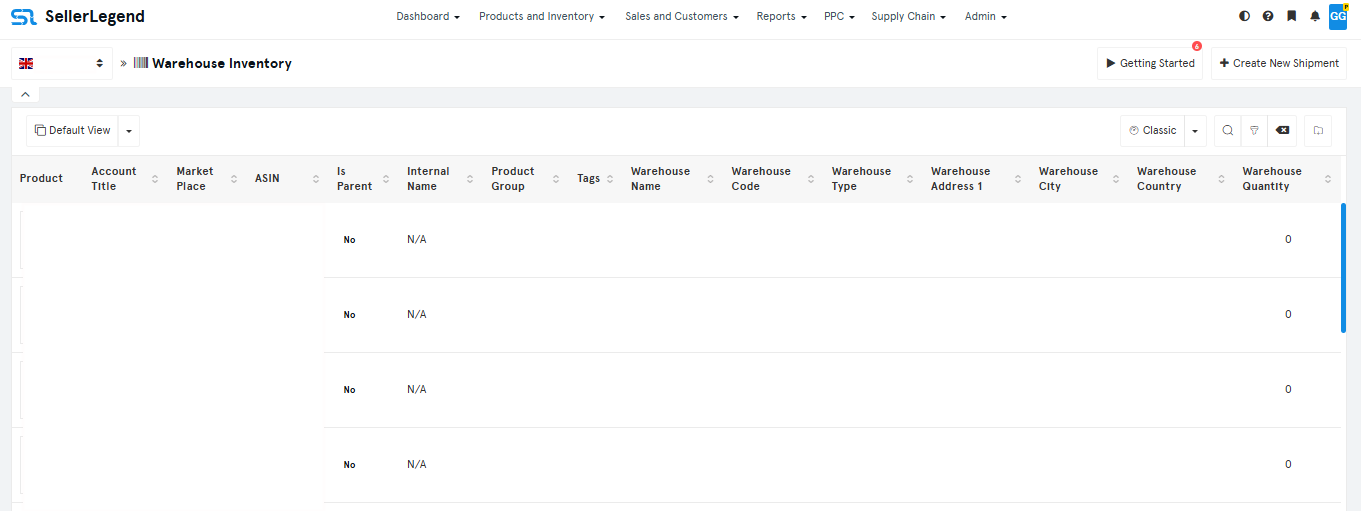
Content
(*) denotes features not yet implemented at the time of writing
- ProductThe main name or title of the item, often including a thumbnail image (columns seem empty in this view).
- Account TitleThe name of the specific Amazon Seller central account the product is associated with.
- MarketPlaceThe specific country or region where the product is listed (e.g., US, UK, DE).
- ASINThe Amazon Standard Identification Number; a unique identifier for the product on Amazon.
- Is Parent Indicates whether the listed product is a variation parent (e.g., ‘Yes’ or ‘No’).
- Internal Name A custom, user-defined nickname for the product, helpful for internal tracking.
- Product Group The category or collection that the product is assigned to for organization.
- Tags Any specific labels or keywords attached to the product for easier filtering and reporting.
- Warehouse Name The name of the specific location where this internal inventory is stored.
- Warehouse Code A unique code identifying the specific warehouse location.
- Warehouse Type The categorization of the warehouse (e.g., internal, 3PL).
- Warehouse Address 1 The primary street address of the warehouse.
- Warehouse City The city in which the warehouse is located.
- Warehouse Country The country in which the warehouse is located.
- Warehouse Quantity The current total number of units available at that specific warehouse location.